Saved preferences, the choice that lets 4Search remember your lists
On this page
Saved preferences is one of the optional choices in the privacy panel. When it is on, this site keeps the things you choose to save, such as the stocks you follow or the places you star on a map, in your browser. When it is off, nothing of that kind is kept.
#Where the choice appears
Saved preferences is offered on a site only when the site has something to save. It sits between Google search results and AI-assisted answers in the panel, and it is off until you switch it on.
The text beside the switch names exactly what this site keeps, so it can differ from one site to another.
#Turn it on
There are three ways, and they all do the same thing.
- When you follow something. If Saved preferences is off, a box appears with a title such as Enable cookies to follow AAPL. Select Enable cookies and follow to turn the choice on and finish what you started. Select Not now to leave it off.
- In the privacy panel. Open it and switch Saved preferences on (steps below).
- With Allow All. On the banner or in the panel, Allow All turns on every optional choice, including this one.
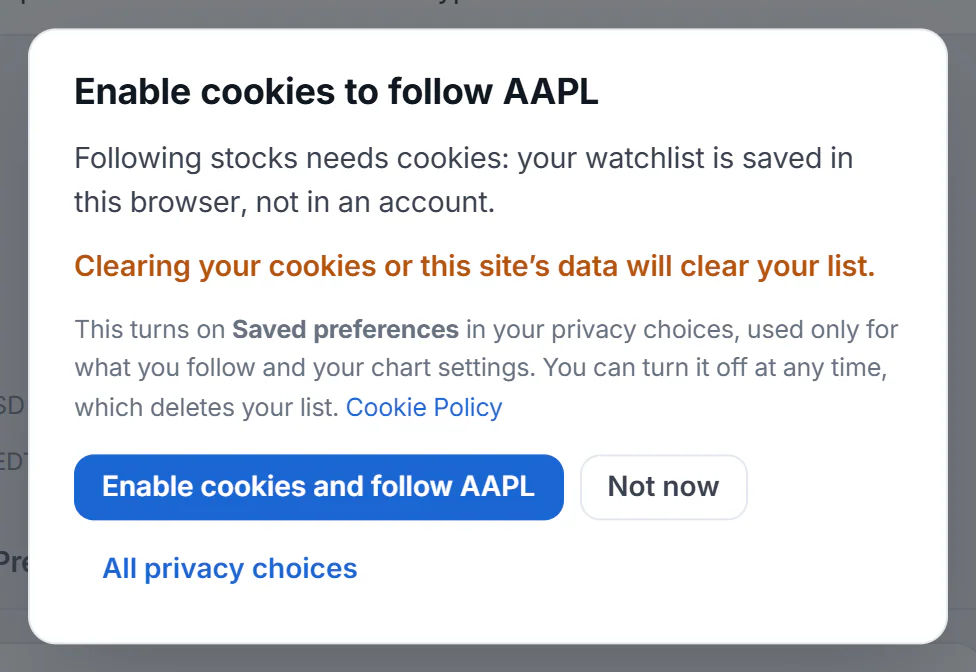
The first time you follow something, 4Search explains why it needs cookies and lets you choose.
- 1Enable cookies and follow
- 2Not now
- 3All privacy choices
Turning on Saved preferences from the box changes only this choice. It does not turn on AI-assisted answers or advertising.
-
Select the round shield button at the bottom left of any page. If you have not made a choice yet, select Manage choices on the banner instead.
-
Find Saved preferences and switch it on.
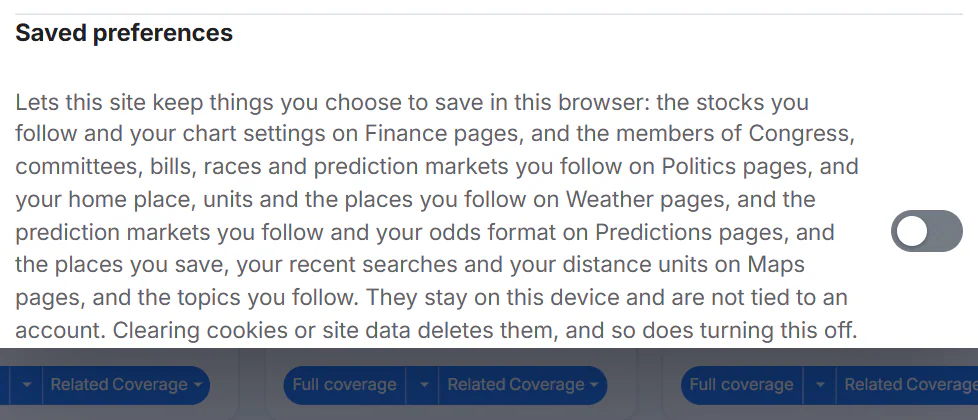
The Saved preferences switch is off until you turn it on.
- 1Switch on to let this site keep your lists
-
Select Save choices.
#What it keeps
The list below is for a site that has every service. Your site's panel lists only the ones it has.
| Where | What is kept | The most it holds | Sent with page requests? |
|---|---|---|---|
| Finance | The stocks you follow (your watchlist) and your chart settings: chart type, volume, previous-close line, event markers and indicators | 50 stocks | Yes: the symbols on your watchlist go with the requests that show their prices |
| Politics | The members of Congress, committees, bills, races and prediction markets you follow | 60 items | Yes: the list goes with the requests that show your Following page |
| Predictions | The markets you follow, with each market's chance and the date when you followed it so the page can show how it moved, and your odds format | 100 markets | Yes: the markets you follow go with the requests that show them |
| Weather | Your home place, your units (°F or °C) and the places you follow | 30 followed places | The home place and units are cookies sent with your requests so Weather pages can show them; followed places go with the requests that show them |
| Maps | The places you save and the list each one is in, your last dozen searches, and your distance units | 500 saved places | No |
| Topics | The topics you follow | 50 topics | No |
#What it does not do
- It is not an account. Nothing is tied to your name, email address or a sign-in.
- It stays in this browser. It does not move to your other devices or other browsers.
- It does not switch on anything else. AI-assisted answers, advertising and Google search results are separate choices. See Your privacy choices.
#Turn it off, and what that deletes
Open the privacy panel, switch Saved preferences off and select Save choices. Selecting Reject non-essential also turns it off.
Turning it off deletes what it kept: your watchlist and chart settings, the things you follow, your home place and followed places, your saved map places, recent searches and saved units. It takes effect at once. Turning the choice back on later does not bring the items back.
Your units choice on Weather is a small exception. Without Saved preferences it is kept only until you close the browser, instead of for a year.
Clearing your browser's cookies and site data for this site deletes the same things, and the privacy choice itself, so the banner returns. See What stays in your browser, and how to clear it.
#What still works without it
Searching, reading, the theme you pick and everything you do not save work without Saved preferences. A few settings last only as long as the page or the browser session: Finance chart settings last for the page view, the odds format applies to the page you are on, and Maps distance units last until you close the tab.
#Common questions
Is Saved preferences required?
No. It is optional and off until you switch it on. You can use 4Search without it. You cannot keep lists or a home place.
Does turning it on create an account or a profile?
No. It lets your own browser keep the items you save. The Cookie Policy describes them as not tied to an account and not stored on 4Search's servers. Some pages send the list along with the request that draws the page, as the table above shows.
I followed a stock and it disappeared. Why?
Most often the site's data was cleared, Saved preferences was turned off, or you are in another browser or a private window. See My choices, followed items or settings are not remembered.
Can I move my lists to a new device?
There is no export or sync, because there is no account. Follow the items again on the new device. Saved map places can be downloaded from the Saved view in Maps.
Is the theme a saved preference?
No. The theme is a display setting that stays in your browser without this choice. See Choose Hybrid, Light or Dark.